The Microsoft Agent Framework is an open-sourced SDK which combines the Semantic Kernel and AutoGen into a single, highly innovative set of AI capabilities into a single library. AI features like:
- Unified model connectivity and chat clients for OpenAI, Azure OpenAI, Anthropic, Ollama, and other leading LLM providers.
- Multi-agent orchestration, allowing specialized AI agents to collaborate, communicate, and solve complex tasks as a coordinated team.
- Tool and MCP (Model Context Protocol) integration, enabling agents to call APIs, access enterprise systems, execute functions, and interact with external services.
- Memory and context management, allowing agents to retain conversation history, manage state, and leverage long-term contextual knowledge across interactions.
- Workflow and process orchestration, enabling developers to build structured, multi-step AI processes with human-in-the-loop approvals, branching logic, and durable execution.
Single agent systems are often too limited in scope, bound to a single instruction (system prompt). To manage more complex AI Agent workflows creating multiple AI Agents managed by an AI orchestrator. The AI orchestrator provides:
- The assignment of specific skillsets to multiple AI Agents
- Combine the output from multiple AI Agents for better decision making
- The coordination of AI Agent execution throughout the workflow
- Dynamic AI Agent execution based on rules or context
The following is a portion of a mind map which I am using for the AI-103 exam for which this post is preparing me for. I use a great online tool named Coggle.
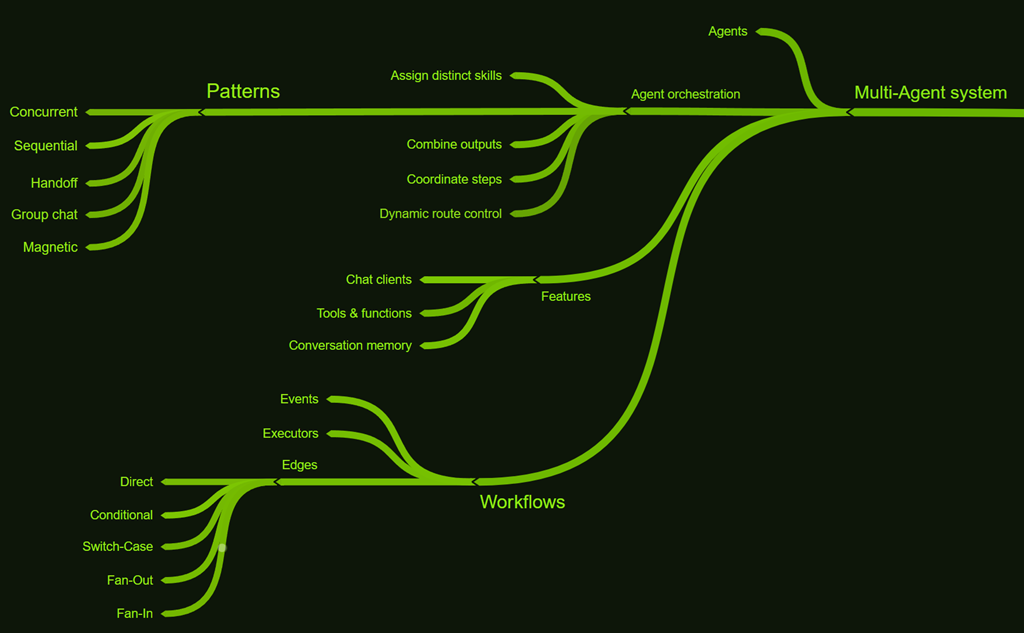
Figure 1, mind map for multi-agent solutions
Multi-agent Workflow core components
Here is a nice overview of these in more detail, as you can see in Figure 1 that there are 3 components.
- Executors – receive input messages, perform specific actions, and produce outputs that move the workflow toward completing its goal.
- Edges – define how messages flow between executors
- Events – built-in events that improve observability and debugging during workflow execution
Multi-agent orchestration patterns
Here is a very nice post which discusses the same from the following Table 1.
| Pattern | Description |
| Concurrent | Broadcast the same task to multiple agents at once and collect their results independently. Useful for parallel analysis, independent subtasks, or ensemble decision making. When to use: When tasks can run at the same time, When the task benefits from different specialized skills or approaches |
| Sequential | Pass the output from one agent to the next in a fixed order. Ideal for step-by-step workflows, pipelines, and progressive refinement. When to use: Processes made up of multiple steps that must happen in a specific order, Data workflows where each stage adds something important that the next stage needs |
| Handoff | Dynamically transfer control between agents based on context or rules. Great for escalation, fallback, and expert routing where one agent works at a time. When to use: Tasks need specialized knowledge or tools, Multiple-domain problems require different specialists |
| Group chat | Coordinate a shared conversation among multiple agents (and optionally a human), managed by a chat manager that chooses who speaks next. Best for brainstorming, collaborative problem solving, and building consensus. This pattern is useful for simulating meetings, debates, or collaborative problem-solving. When to use: Spontaneous or guided collaboration among agents, Real-time human oversight or participation, Creative brainstorming. Maker-checker loops – one agent (the maker) proposes content or solutions, and another agent (the checker) reviews and critiques them |
| Magentic | A manager-driven approach that plans, delegates, and adapts across specialized agents. Suited to complex, open-ended problems where the solution path evolves. When to use: The problem is complex or open-ended with no predetermined solution path, A step-by-step, dynamically built execution plan adds value before running the tasks |
Table 1, multi-agent orchestration patterns
To develop a sequential multi-agent solution with the Microsoft Agent Framework the following steps are necessary.
- Add references
- Create the AI chat client
- Create the AI Agents
- Create the orchestration
- Trigger the orchestration and display the output
Add references
You first need to install the packages that provide the functionality for a multi-agent solution, they are:
Once installed import them into your solution like the following.
from agent_framework import Message
from agent_framework.foundry import FoundryChatClient
from agent_framework.orchestrations import SequentialBuilder
Listing 1, import multi-agent libraries
Create the AI chat client
credential = AzureCliCredential()
chat_client = FoundryChatClient(
    credential=credential,
    project_endpoint=os.getenv("AZURE_AI_PROJECT_ENDPOINT"),
    model=os.getenv("AZURE_AI_MODEL_DEPLOYMENT_NAME"),
)
Listing 2, create the multi-agent client
Retrieve the authentication credential and set the the required Microsoft Foundry project endpoint and deployed LLM model.
A quick note is that you must login using az login before the AzureCliCredential() will function so that the credential exists.
Create the AI Agents
In a sequential multi-agent solution scenario, like other multi-agent solution, more than a single agent will be performing actions. Each agent must be instantiated, named, and given the instructions to perform when triggered. Notice in the following code snippets that the instructions are provided and then utilized during the instantiation of them.
summarizer_instructions="""
  Summarize the customer's feedback in one short sentence.
  Keep it neutral and concise.
  Example output:
    App crashes during photo upload.
    User praises dark mode feature.
  """

summarizer_agent = chat_client.as_agent(
    name="summarizer",
    instructions=summarizer_instructions,
)

classifier_instructions="""
  Classify the feedback as one of the following:
  Positive, Negative, or Feature request.
  """

classifier_agent = chat_client.as_agent(
    name="classifier",
    instructions=classifier_instructions,
)

action_instructions="""
    Based on the summary and classification, suggest the
    next action in one short sentence.
    Example output:
      Escalate as a high-priority bug for the mobile team.
      Log as positive feedback to share with design and marketing.
      Log as enhancement request for product backlog.
    """

action_agent = chat_client.as_agent(
    name="action",
    instructions=action_instructions,
)
Listing 3, multi-agent instructions and instantiation
There are 3 AI Agents configured: summarizer_agent, classifier_agent, and the action_agent.
Create the orchestration
Recall from Listing 1 that the SequentialBuilder class was imported. Each of the different patterns has its own class. Concurrent, Handoff, Group chat, and Magentic. To create the orchestration you instantiate the sequential builder as a workflow, as seen in Listing 4.
workflow = SequentialBuilder(
  participants=
    [summarizer_agent, classifier_agent, action_agent],
  output_from="all",
).build()
Listing 4, create the multi-agent orchestrator
Notice one of the attributes named participants which loads the instance of each AI Agent from Listing 3.
Trigger the orchestration and display the output
This sequential multi-agent process can be embedded into a larger application and triggered from a button click, an event of some kind or, after some adjustments via a REST API call. The trigger the sequential multi AI Agent solution, execute the code in Listing 5.
result = await workflow.run(f"Customer feedback: {feedback}")
outputs = result.get_outputs()
Listing 5, trigger the multi-agent solution
By passing some feedback into this agent, the following illustrates the outcome.
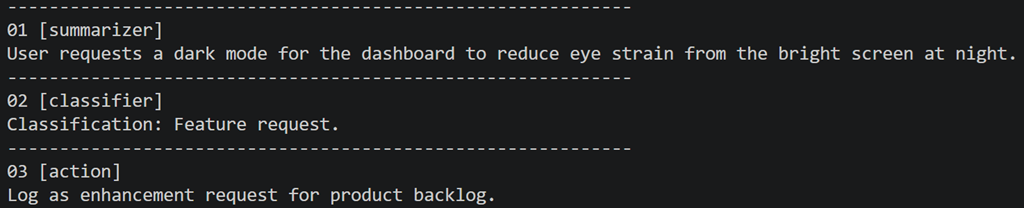
Figure 1, multi-agent sequential output
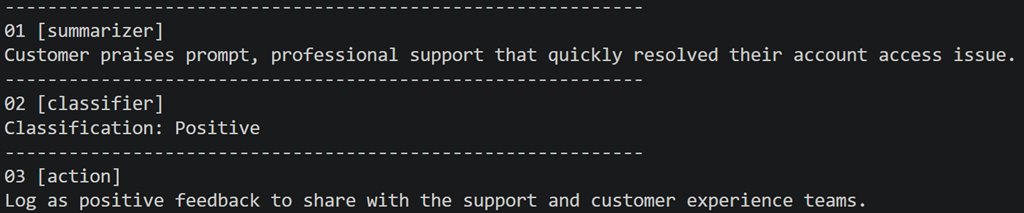
Figure 2, another multi-agent sequential output
Each context sent to the agents will utilize that input to generate relevant results.