In my last post Advanced multi-agent orchestration architectures I wrote about Hub-and-Spoke, Hierarchical, and Supervisor patterns. In this article, as the title makes clear I will get a bit deeper into hub-and-spoke. But before that, as I was writing the hub and spoke code I learned a few hard lessons. I share them in case you are experiencing the same issue, but I expect as the innovation and change continues to progress that some of these will go away and get resolved.
Firstly, I was combining V1 and V2 features of azure.ai.projects, this area is still fast evolving but I found some great information here which helped me progress. I also provide Table 1 which describes the differences between V1 (Microsoft Foundry) and V2 (Microsoft Foundry Agents Service). The example I found most were targeting V1, but the training I was taking was V2, or seemed also like a combination of both.
Table 1, V1 vs V2 azure-ai-projects
| V1 | V2 |
| Threads | Conversations |
| Runs | Responses |
| Messages | Input/Output Items |
| requires_action | Explicit tool call loop |
| submit_tool_outputs | Response continuation |
| Assistants | Agents |
The other important concept to understand is the difference between Prompt Agents and Hosted Agents. The context for this article is Hosted Agents. When you use Hosted Agents you do not need to worry so much about “containerization, web server setup, security, memory persistence, scaling, instrumentation, and version rollbacks” because the execution of the agent and its inference with the LLM happen on Microsoft Foundry. It is common, during testing to run agents, by running I mean, the compute they consume is your personal workstation, and in that can you need to manage all the pre-mentioned dependencies.
The following illustrated, Figure 1, is generated by AI using a short prompt and the source code I wrote for hub-and-spoke-async.py.
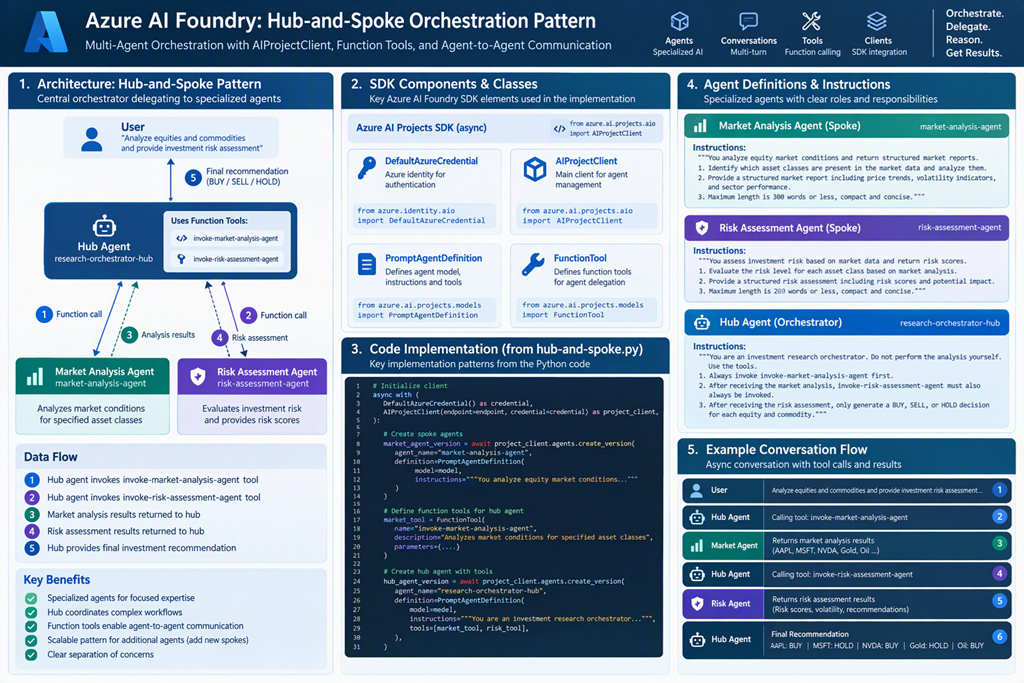
Figure 1, hub and spoke advanced orchestration pattern
You can find the hub-and-spoke example I coded here: https://github.com/benperk/AI/blob/main/hub-and-spoke-async.py instead of pasting all code in this article. I’ll refer to the lines of code at that location, and share some snippets.
To implement the hub-and-spoke advanced multi-agent orchestration solution I utilized 2 different clients to perform the necessary V2 activities:
AIProjectClient(endpoint=endpoint, credential=credential) as project_client
project_client.get_openai_client(agent_name=hub_agent_name)
As you can see here on line 147 I used project_client to instantiate the AI Agent and again on line 185 to get the Azure Open AI Client. Later on line 198 the Open AI client is used to instantiate the conversation then again on line 202 to create the response.
conversation = await hub_client.conversations.create(
        items=[{"type": "message", "role": "user", "content": user_query}],
    )
Listing 1, line 198
response = await hub_client.responses.create(conversation=conversation.id)
Listing 2, line 202
Figure 2 illustrates in detail how the pieces of the code fit together.
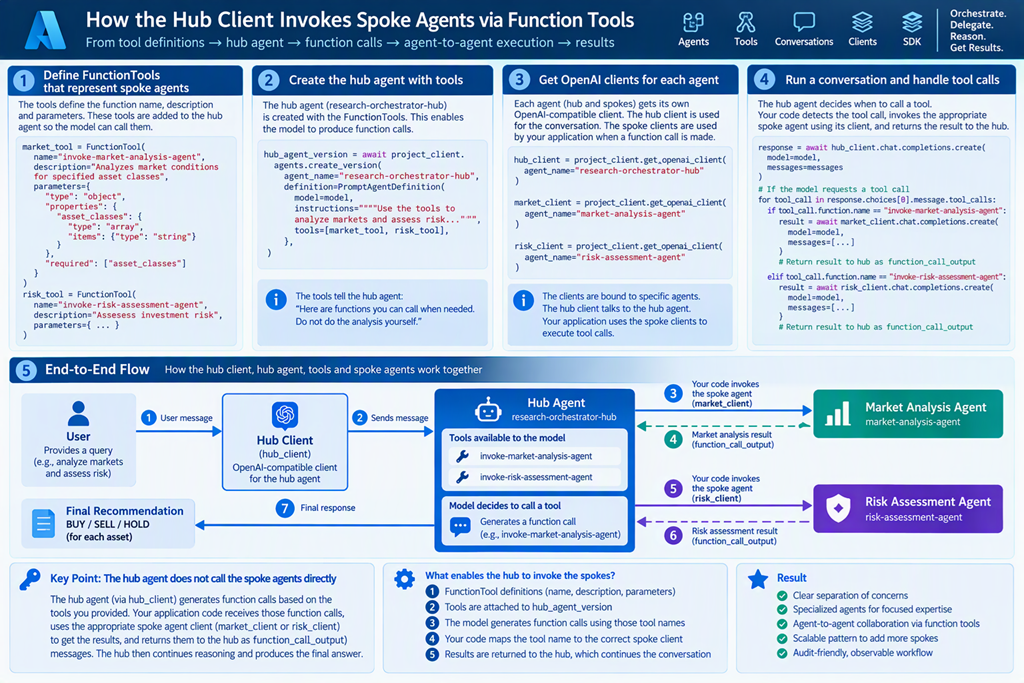
Figure 2, detailed hub and spoke advanced orchestration pattern
Figure 3 illustrates the output of the execution.
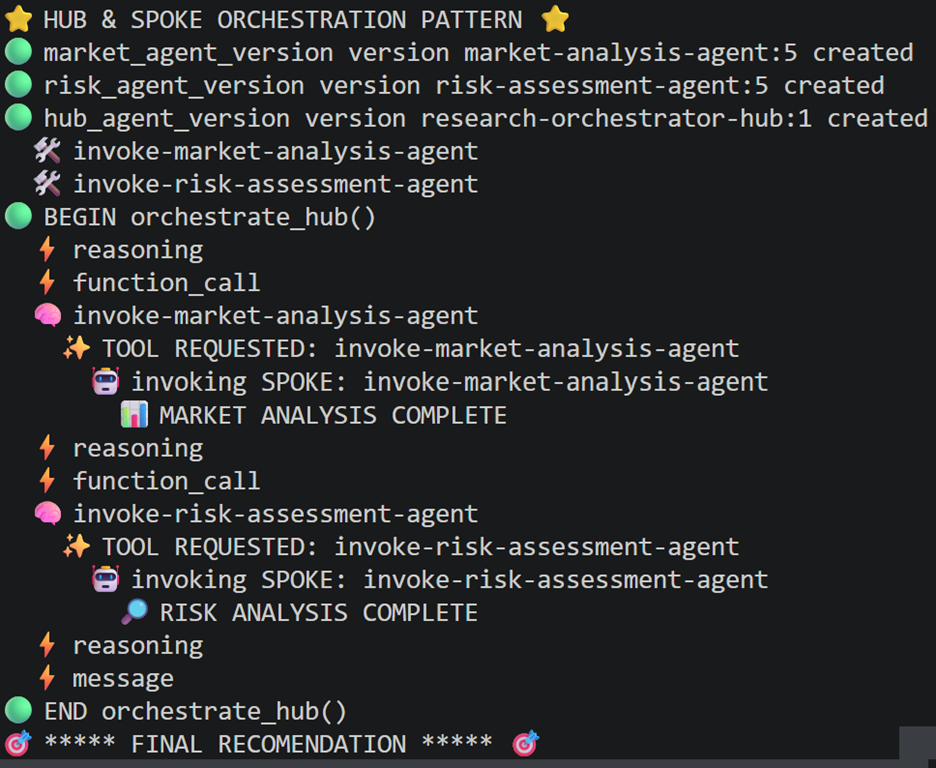
Figure 3, detailed hub and spoke advanced orchestration pattern output
I will add a few additional explanations for this implementation, through the different portions of the pattern from here.
Define Spoke Agents and Tools
In this example there are 2 spoke agents one for marketing research and one for risk analysis. The agents are created using the project_client.agents.create_version method. These agents then get created in Microsoft Foundry as seen in Figure 4.
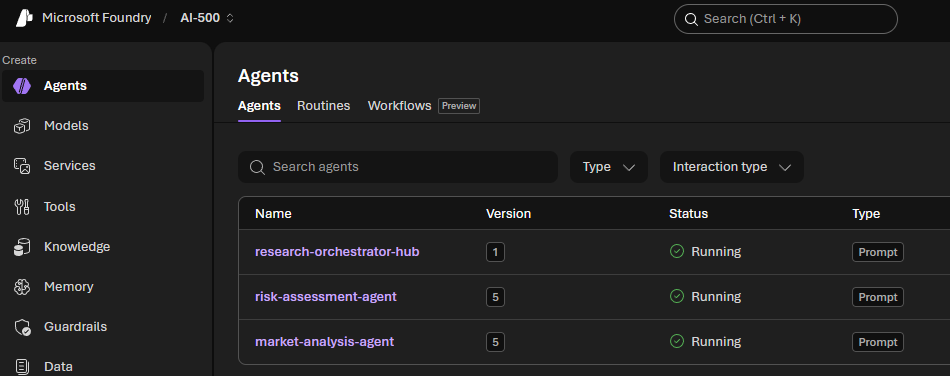
Figure 4, detailed hub and spoke advanced orchestration pattern hosted agents in Microsoft Foundry
Each agent is associated with a name and a instruction prompt, again using the project_client. Later, project_client.get_openai_client(agent_name=hub_agent_name) is used to create the clients which are used in the SPOKE.
Create Hub Agent with Orchestration Loop
The hub is created in the same way as the spoke, the main difference is that the FunctionTools as passed as a property to the create_version() function.
The orchestration loop is where I like to say “the magic happens”. I suppose to better understand how it works one would need to perform a deep dive into the responses.create method called from line 202. The response returns numerous items, as you can seen in Figure 3, you can see reasoning, function_call, and message. When there is a function_call the model is saying “I want somebody to execute the tool named invoke-market-analysis-agent.” This will in-turn invoke the spoke passing either invoke-market-analysis-agent or invoke-risk-assessment-agent into the spoke method along with the clients for the associated market or risk agents. The the agent is invoked, inferred, and returns the response.
The loop continues until all function_calls are executed, finally returning the results to the Hub for final rendition.
Here is some more great information about implementing hub-and-spoke pattern.