Artificial Intelligence (AI) is more than OpenAI or Anthropic who have created some very awesome LLMs that can do amazing things, especially with Natural Language Processing (NLP). AI can also extract information from documents, convert text-to-speech and speech-to-text, provide metadata and summaries of images and videos, of course AI Agents. All of the AI capabilities are available on Microsoft Foundry. In addition to those AI tools there also exists built in tools contained within the chosen APIs to consume such AI features, those illustrated in the Table 1.
| Tool | Description |
| code_interpreter | A Python environment in which the model can generate and run code. |
| web_search | A tool that enables the model to find general information on the Internet, which allows it to base responses on more current data than it was trained on. |
| file_search | A tool that enables the model to search specific files that you upload to a dedicated vector search index – enabling it to ground responses in specific knowledge. |
| function | A tool that enables the model to call custom functions in your application code. |
Table 1, built-in API generative AI tools
What exactly makes these tools different than MCP or custom tools? The concept is the same, but in this case you do not need to code anything or optimize the prompt so that the correct tool gets chose to infer the response. It is a small difference on the surface but I think the more options you are aware of and the more opportunity you have to try them how to learn the benefits and costs, the better. I like this approach because it is simpler than configuring and managing MCP server and writing the code for custom tools. Especially when those 4 mentioned tools in Table 1 matches exactly what you need to create and implement.
NOTE: these tools are available in the OpenAI SDK from: from openai import OpenAI
code_interpreter
The most common use cases for this tool are described in Table 2.
| Use case | Description |
| Data Analysis | Parse a CSV file and generate summary statistics |
| Math & Physics | Solve differential equations or simulate physics scenario |
| File Conversion | Convert between data formats (JSON ↔ CSV, and so on) |
| Prototyping | Test algorithms and ideas before formal implementation |
Table 2, code_interpreter use cases
To use the code_interpreter tool use this code snippet.
from openai import OpenAI

response = client.responses.create(
    model=os.getenv("OPEN_AI_MODEL"),
    instructions=(
        """You are an AI assistant that provides information.
        Use the python tool to run code for math problems."""
    ),
    input="What is the square root of 16?",
    tools=[
        {
            "type": "code_interpreter",
            "container": {"type": "auto"}
        }
    ]
)
Listing 1, code_interpreter
By simply adding “code_interpreter” as the tool the LLM wrote Python code to generate the outcome. Adding “Show the code that is written to produce the output.” to the instructions results in the following.
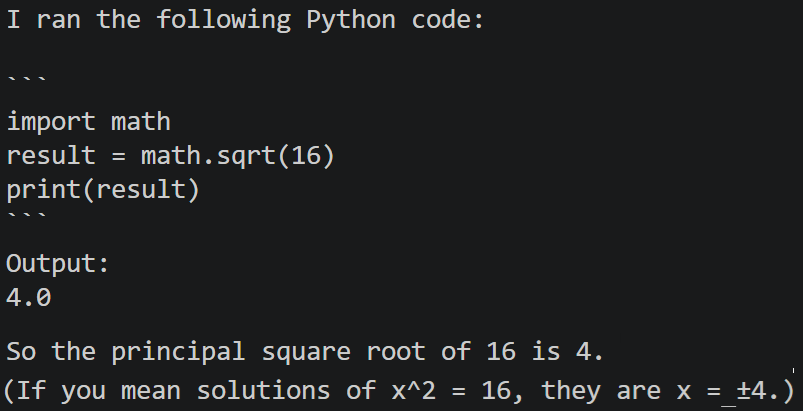
Figure 1, code_interpreter inference
web_search
The most common use cases for this tool are described in Table 3.
| Use case | Description |
| Current Events | Summarize key updates on a breaking technology announcement |
| Market Research | Compare recent product features or pricing across vendors |
| Policy Monitoring | Check whether regulations or guidance have changed |
| Fact Verification | Validate claims against reputable public sources |
Table 3, web_search use cases
Here is the snippet to utilize the web_search tool.
response = client.responses.create(
    model="gpt-5-mini",
    instructions=
    """You are an AI assistant. Use web search when current
    information is required. State the sources used to verify
    this fact.""",
    input="Who is the best C# programmer in the world?",
    tools=[{"type": "web_search"}]
)
Listing 2, web_search
file_search
The most common use cases for this tool are described in Table 4.
Locate specific clauses across contract documents
| Use case | Description |
| Policy Q&A | Answer employee questions from HR policy PDFs |
| Support Assistants | Retrieve product steps from internal troubleshooting guides |
| Legal Review | |
| Knowledge Discovery | Summarize answers from technical documentation sets |
Table 4, file_search use cases
For this one, take a look at this snippet.
response = openai_client.responses.create(
  model=model_deployment,
  instructions="""
  You are a recruitment assistant that provides information
  on candidates based on their CVs and resumes.
  Answer questions about candidates using the provided resumes.
  Search the web for general information about skills if needed.
  """,
  input=input_text,
  previous_response_id=last_response_id,
  tools=[
      {
          "type": "file_search",
          "vector_store_ids": [vector_store.id]
       },
       {
           "type": "web_search"
       }
  ])
Listing 3, file_search
In this example I loaded my CV/Resume into memory and passed them to the OpenAI endpoint as grounding information. Then the prompt was executed against it using the provided documentation. Hurray for me, AI thinks I would be a great Azure AI Architect.
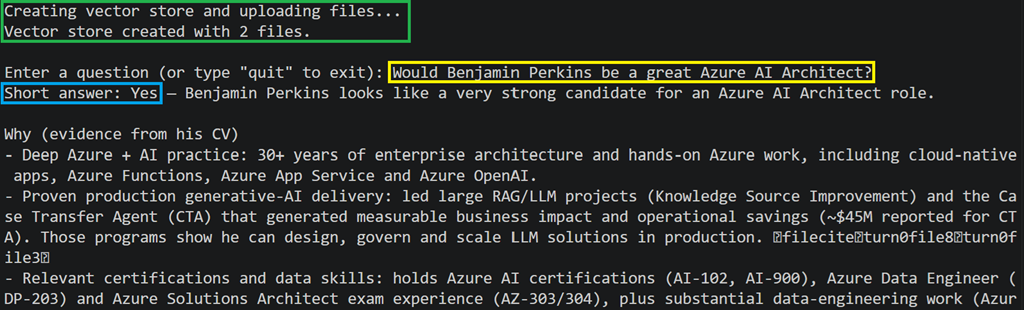
Figure 2, file_search inference
function_tool
The most common use cases for this tool are described in Table 5.
| Use case | Description |
| System Integration | Call an internal API for account or order details |
| Task Automation | Trigger workflows like ticket creation or notifications |
| Data Lookup | Query business rules or reference tables before answering |
Table 5, function_tool use cases
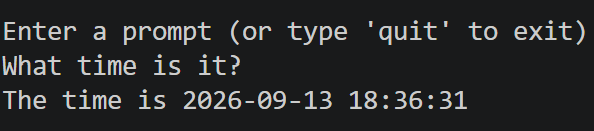
This one is very similar, well almost identical to custom tools written about in my other blog titled Integrate custom tools into an AI Agent. This tool let’s you add a function to your python code and pass it to the Open AI endpoint. Create the function you want or need to fulfill the requirment, in this case, the current time.
def get_time():
    return f"The time is
      {time.strftime('%Y-%m-%d %H:%M:%S',
       time.localtime())}"
Listing 4, function_tool function code
Then generate a string that defines the tool.
function_tools = [
  {
    "type": "function",
    "name": "get_time",
    "description": "Get the current time"
  }
]
Listing 5, function_tool function_tools definition
And then pass it along with the request to the OpenAI endpoint.
response = client.responses.create(
  model=model_deployment,
  input=messages,
  tools=function_tools
)
Listing 6, function_tool inclusion when OpenAI endpoint